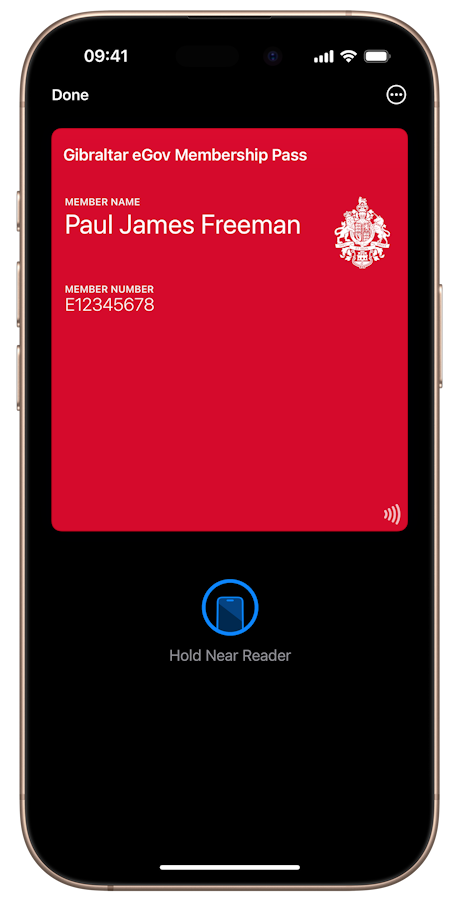
What is the eGov Membership Pass?
The eGov Membership Pass (ePass) is a free, secure digital pass that you can add to your mobile wallet and use as a contactless access key when interacting with selected Government services and locations.
What are the benefits of having my eGov Membership Pass in Apple Wallet or Google Wallet?
Keeping your eGov Pass in Apple Wallet or Google Wallet means it is always with you on your mobile device. You can tap to access supported services quickly.
Do I need an eGov account to use the Membership Pass?
Yes. The eGov Pass is linked to your personal eGov account. If you do not already have an account, you can register for free on the eGov portal or on the eServices app.
Does the eGov Membership Pass cost anything?
No. The eGov Pass is provided free of charge to all eGov users.
Which devices are supported?
The eGov Pass is available on selected NFC-enabled smartphones and compatible devices, including iPhone models that support Apple Wallet and Android devices that support Google Wallet. Availability may depend on your device's operating system.
How do I add the eGov Membership Pass to my Apple Wallet?
First download and install the eServices app on your iPhone. Sign in to your eGov account, go to the Account section and select 'Add to Wallet'. Follow the on-screen instructions and tap 'Add' when prompted to store your eGov Pass in Apple Wallet.
How do I add the eGov Membership Pass to Google Wallet on Android?
Install the eServices app from the Google Play Store and sign in to your eGov account. In the Account section, choose the option to add your eGov Membership Pass to your mobile wallet and follow the prompts. Your pass will then appear in Google Wallet.
How do I use my eGov Membership Pass from my iPhone and Apple Watch?
On iPhone, double-click the side or home button (depending on your model), choose your eGov Membership Pass in Apple Wallet and hold the top of your iPhone near the contactless reader until you feel a vibration or see a confirmation on screen.
Where do I hold my device when using the Pass?
Hold the top of your iPhone or the back of your Android phone near the contactless reader, aligning it with the contactless symbol shown on the reader. Keep your device there until you see or hear a confirmation that your tap has been recognised.
Where can I use my eGov Membership Pass?
You can currently use your eGov Pass at selected Government counters and kiosks that display the contactless symbol, including GHA appointment check-in kiosks at the Primary Care Centre, the Midtown Car Park access system and kiosks located at The Customer Care Hub that allow you to check your voter registration details. The list of services and locations will expand over time.
Will more services support the Pass in future?
Yes. The number of services and locations accepting the eGov Pass will grow over time as additional public services and kiosks come online.
Is the eGov Membership Pass a legal form of identification?
No. The eGov Membership Pass is not a legal form of identification. It is a secure digital access key used to connect you to information held on Government systems and to streamline access to supported services. Where physical identification is legally required, existing procedures will continue to apply.
Is my data secure when I use the Pass?
Yes. The eGov Pass uses secure, tamper-resistant technology and is linked to the eGov platform. The pass does not store sensitive personal information on your device. Instead, it provides a secure reference that allows Government systems to retrieve your data from central servers when you tap at a supported reader.
What information is stored on my device?
Only the minimum information required for your eGov Pass to function as a secure digital access key is stored in your mobile wallet (i.e. Member Name and ePass Document Number). Your detailed personal information remains on Government servers and is accessed only when needed to provide a specific service.
Do I need an internet or mobile data connection to use the Pass?
The eGov Pass uses NFC technology to communicate with contactless readers. Your mobile phone does not need an active data connection at the moment you tap.
What happens if I change or lose my phone?
If you change or lose your phone, simply install the eServices app on your new device, sign in to your eGov account and re-add your eGov Pass to your wallet. If your device is lost or stolen, you should follow your device manufacturer's security guidance and review your eGov account activity.
Can I have the eGov Membership Pass on more than one device?
Yes, you may add your eGov Pass to more than one of your own compatible devices by signing in to your eGov account on each device and following the steps to add the pass to your wallet.
How do I remove the eGov Membership Pass from my device?
You can remove the eGov Pass at any time from your wallet app. Open Apple Wallet or Google Wallet, select your eGov Membership Pass and choose the option to remove or delete it from your device. You can add it again later via the eServices app if you change your mind.
Is the eGov Pass an ID card or the same as one?
No. The eGov Pass is a digital access pass designed to connect you securely to supported Government services. It is not a legal or physical form of identification and should not be treated as one.
Can I use the eGov Pass for travel or border control?
No. The eGov Pass cannot be used to prove identity, it is not a travel document and is not valid for border crossings, immigration control or international travel.
Can the eGov Pass be used for boarding flights or travel verification?
No. The eGov Pass cannot be used to prove identity. It is not accepted for airline boarding, security screening or travel identity checks. Always use official travel documents when travelling.
Can I share my eGov Pass with someone else?
No. The eGov Pass is personal to you and cannot be shared, transferred, copied or used on behalf of anyone else. Sharing the pass is not allowed and may result in access being revoked.
How can I get help beyond this FAQ or if my eGov Membership Pass is not working?
If your eGov Pass does not appear in your wallet, is not recognised at a reader or you see an error message, first check that your device software and wallet app are up to date and that NFC is enabled. If the problem continues, please contact the eGov Customer Care Hub team via support@egov.gi, the online chat at portal.egov.gi or by calling in at the eGov Customer Care Hub office at 323 Main Street. Opening hours are Monday to Thursday from 8:30am to 3:00pm, and Friday from 8:30am to 2:30pm (excluding Public Holidays).
Where can I find the latest information?
Visit www.egov.gi/ePass for updates on supported services, technical requirements and guidance on using your eGov Membership Pass.